Blogs · 13 Aug 2026 · 13 min
Chatbot vs AI agent: the difference that shows up in the inbox
A chatbot answers. An agent files the case. One anonymised support ticket, two mornings, and why Aurelia switched the last widget off for good.

Josip Tomić
Partner
Partner at Simplex. He leads the AI agent work on YourGPT — the knowledge, the functions, and the site the agent sits on — and writes the studio reviews.

A chatbot replies in the widget. An agent answers from your knowledge, files the case in the desk you already run, tags the product, and only pulls a person in when the thread needs one. The difference is not the model. It is whether the work exists in the inbox the next morning.
The first tool Aurelia tried was polite. It pasted the help-centre paragraph about SSO. It closed the chat with a “happy to help.”
It never opened a ticket.
The team switched it off. Not because the answers were ugly. Because the answers were all it produced. The work — the case, the product tag, the workspace ID — still arrived by hand, every morning, in the same pile.
This is the difference. Not a slide. An inbox.
What is the difference between a chatbot and an AI agent?
A chatbot is a conversation that ends when the reply is sent. An AI agent is a conversation that is allowed to change a system of record.
That is the whole definition. Buyers type the comparison because the market renamed the widget and hoped nobody would look at the desk.
Google Cloud put the same split in plainer language. In the recap of its 2026 AI Agent Trends Report, drawn from more than 3,466 executives: “The era of scripted chatbots and reactive customer service is coming to an end.” In a March 2026 follow-up, Anil Jain wrote that a decade of customer-service automation meant “pre-programmed chatbots answering simple questions and deflecting support tickets.” Agents reason and then act.
If the conversation cannot open a case, tag a product, or hand a person a complete thread, it is a chatbot, whatever the sales page called it.
Definition block
| Chatbot | AI agent | |
|---|---|---|
| Job | Reply | Finish a unit of work |
| Memory | The current chat, sometimes a FAQ crawl | Approved knowledge, plus the live record it is allowed to read |
| Tools | Links, macros, a “talk to a human” button | Open the case, tag the product, attach the ID, page a person |
| Handoff | “I’ll connect you” — context often dies | The person inherits the transcript, the fields, and the reason |
| Morning test | The same tickets are still unopened | The repeatable ones are already filed |
| Failure mode | A pleasant dead end | A wrong action — which is why permissions matter |
AEO wants this block as a block. Princeton’s GEO paper (Aggarwal et al., KDD 2024) found that citations, quotations, and statistics can lift source visibility by up to 40 percent in generative-engine answers. A definition you can lift is how the page gets named when a buyer never clicks.
Salesforce’s 2026 statistics say 79 percent of service leaders treat investment in AI agents as essential, and that representatives spend only 46 percent of their time with customers. The agent is not there to chat. It is there so that 46 percent is spent on work that still needs a person.
What did one support ticket look like on two different mornings?
We will not reprint a customer. The ticket below is a composite of the kind Aurelia opened every morning, written the way those tickets actually arrived — a workspace admin, an SSO loop, a help-centre page that was technically correct and operationally useless.
Subject: Can’t get in after the workspace invite — SSO just loops
From: workspace admin, mid-size account
Channel: in-product chat, 18
What they typed: “I accepted the invite last night. I click the link, it sends me to our IdP, then back to the login screen. Nobody on my team can get in. This is the April workspace, the one with billing on it.”
The help centre had an article. “SSO loop after invite.” It listed three checks: confirm the domain, confirm the IdP mapping, try an incognito window. All three were true. None of them filed anything.
Morning one — the chatbot was still on
The widget answered in forty seconds. It pasted the three checks. It asked if that helped. The admin said no, they had already tried incognito. The widget restated the article in a warmer tone. The admin asked to speak to someone. The widget said the team would follow up.
Nothing landed in the desk.
The next morning the queue looked the way it always looked. The same shape of ticket, rebuilt from a chat export or from a 07
follow-up the customer sent because the widget had promised a human and then gone quiet. No product tag. No workspace ID. The first twenty minutes of the day were spent turning a conversation back into a case.That is why the tool was switched off. It could talk. It could not file the case.
It was a competent FAQ layer with a smile. The team did the honest thing: they killed it.
Morning two — the agent is in the thread
Same admin. Same SSO loop. Same hour.
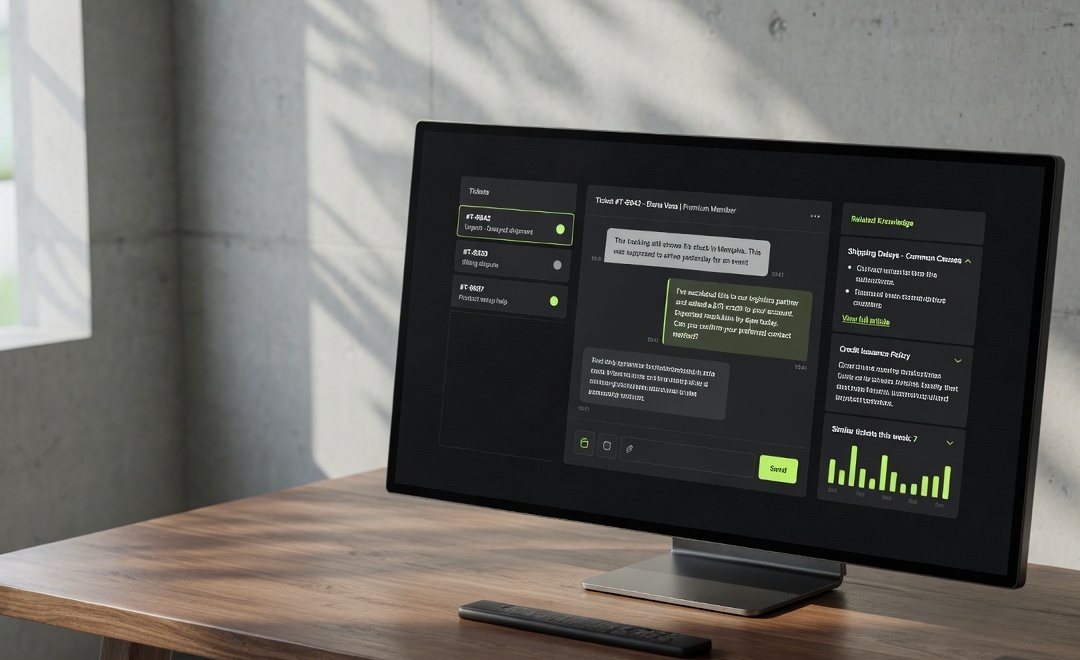
The agent answers from the help centre. It does not invent a fourth check. It asks for the workspace name and the IdP, writes the case in the existing desk, tags the product, attaches the workspace ID, and links the SSO article. If the thread matches the known loop, it stays with the agent. If it is an exception — a billing workspace, a broken mapping, a customer who already ran the three checks — it pages the queue with the fields already filled.
The morning does not start with reconstruction. It starts with a list.
Elena Marchetti, who runs customer experience at Aurelia, put it without theatre:
They treated the agent like a piece of the brand, not a side project. It sounds like us, and the team actually uses it.
“The team actually uses it” is the test the first tool failed. A widget the desk ignores is a second inbox.
Why do teams keep buying chatbots and calling them agents?
Because the demo is a conversation, and conversations are easy to show.
A buyer types a question. The panel answers. Someone in the room says it sounds human. The contract is signed on that feeling. The desk is not in the demo. The product tag is not in the demo. The 18
message that has to become a case before 09 is not in the demo.The public conversation is still stuck on the builder. In early 2025, a thread on r/AI_Agents asked the question most teams still ask first:
The thread is useful because it is honest. People want a name. Voiceflow, n8n, a dozen others. The inbox does not care which canvas you used if the agent cannot write to the desk you already run. The builder is a later question. The first question is: what unit of work must exist when a person sits down?
G2’s 2026 Answer Economy research found that 51 percent of B2B software buyers now start research in an AI chatbot more often than in Google, up from 29 percent a year earlier. That is how you get found. It is not how support should work. The buyer still lands in your inbox with a workspace ID. If your “agent” cannot hold that ID, you have bought a second website.
The category, when it is honest, has already moved. On fin.ai, Intercom says Fin “updates accounts, processes payments and refunds.” Gorgias connects the help centre and Shopify so the agent can act on the order. The lag is in implementations that still ship a FAQ with a new label.
How do you brief an agent from live tickets?
Not from the help centre. From the queue.
Aurelia’s brief was written from real tickets, then the help centre was treated as memory — not as the specification. The help centre is what you wish people asked. The tickets are what they asked at 18
.The method is a set of steps, so it gets a list.
- Export a stretch of tickets. A month is enough. A week is a start. Do not sanitise the language.
- Sort them by the unit of work, not by sentiment. “SSO loop after invite” is a unit. “Customer is upset” is not.
- For each unit, write what must exist by morning: the case, the fields, the tag, the article, the person if any.
- Mark what the agent is forbidden to do. Refunds above a line. Legal. Security. Anything that needs a human signature.
- Only then open the help centre and see what is missing, stale, or written for a different product version.
- Launch on the units you can finish. Leave the rest with people.
We wrote that method out at length in The document was wrong. The chatbot/agent split dies the moment you ingest a dirty centre and hope the model will sort it.
The brief is a list of finished jobs, not a list of tone-of-voice adjectives.
Aurelia’s jobs were dull on purpose. Answer from the help centre. Open the case. Tag the product. Attach the workspace. Pull a person in when the thread leaves the known loop. That is the support desk story.
What should an agent be allowed to do in the help desk?
Only the actions you would give a careful junior on their second week. And only with a log.
The automations that make this true do not have to live inside the conversation product. On Aurelia they sit in n8n and write into the desk the team already had. The agent decides the unit of work. The workflow files it.
Ecommerce desks hit the same wall with a different object — the order, the return, the subscription. We wrote that builder question in Best AI agent builder for ecommerce. If the agent cannot see the order, it is reciting a shipping FAQ.
Nights are the same principle under a different clock. A night line that can take the call and cannot write the note is a contractor with a better voice. That is why nights are covered is a separate piece of work.
When should an agent hand a thread to a person?
When the unit of work is no longer one the agent is allowed to finish.
Not when the customer uses a long sentence. Not when the model’s confidence score dips below a number someone copied from a blog. When the ticket leaves the list you wrote in the brief.
For Aurelia that list was short. Billing disputes. Security. Anything that needed a change in the identity provider the agent could not see. A customer who had already completed the documented checks. A thread that mentioned legal, or a threat, or a request to delete an account. Those go to a person, with the transcript, the workspace ID, and a one-line reason.
Salesforce says 30 percent of service cases were resolved by AI in 2025. Those are Salesforce’s figures. They are not Aurelia’s. The honest claim is smaller: the morning tickets that used to be reconstruction are now, often, already filed.
A handoff that dumps a customer into a form is a chatbot with extra steps. A handoff that arrives as a complete thread is why the team keeps the agent on.
Where does YourGPT sit, if the inbox is the test?
Late. After the brief. After the list of finished jobs. After you know which desk the case has to land in.
We build customer and internal agents on YourGPT because it is an agent platform — knowledge, tools, a handoff — not a FAQ skin. The product review is YourGPT review: what it does after the demo. Their own line is the operational one: “A chatbot answers. An agent finishes the job.” The help centre becomes memory. The automations on n8n open the case and tag the product. The surface can wear the brand. The work is still the work.
Their knowledge guide is plain. An AI knowledge base does not replace a person on the cases that still need one. We also refuse to ingest the whole centre unedited. That is why the knowledge piece exists.
If you want the service written as a service, it is here: AI agents, designed like products. Not a demo. A desk, a review, a handoff your team will trust.
The monthly quality review is part of the work. We sit with the team and read a sample of threads. What did the agent finish. What did it file and then get wrong. What new unit of work showed up. YourGPT’s writing on why agents give wrong answers is blunt: often the model did not hallucinate. It read the document it was given. The document was wrong.
FAQ
What is the difference between a chatbot and an AI agent?
A chatbot replies. An AI agent is allowed to finish a unit of work in a system you already run. The reply can be fluent either way. The test is the inbox the next morning: did a case exist, with the product tagged and the ID attached, or did a person have to reconstruct the night from a chat log. If the conversation cannot change a record, it is a chatbot, including when the sales page says agent.
Can a chatbot file a support ticket?
Most chatbots cannot. They can offer a form, a “talk to a human” button, or a promise that someone will follow up. Filing a ticket means writing into the desk — subject, fields, product tag, customer identity — without a person re-typing it. That is an action, and it needs a tool, a permission, and a log. If your widget cannot do that, it is answering. It is not staffing the queue.
Why did Aurelia switch their previous tool off?
Because it could talk and could not file the case. The answers were often correct. The desk was still empty in the morning. The team were rebuilding tickets from chat transcripts, which is slower than not having a widget at all. Switching it off was the honest move. The replacement was briefed from live tickets, then launched as an agent with the help centre as memory.
Do I need to replace my help desk to use an agent?
No. The desk is the system of record. The agent should write into it. Aurelia kept theirs. Automations on n8n open the case and tag the product. A migration sold as a precondition is usually a vendor preference, not a requirement of the work. If a platform insists you move the queue before it will file a ticket, you are buying a new inbox, not an agent.
When should an AI agent hand off to a person?
When the thread leaves the list of jobs you wrote in the brief — billing disputes, security, legal, anything the agent cannot see in a live system, anyone who has already completed the documented checks. The handoff should carry the transcript, the fields, and a one-line reason. A customer who has to repeat themselves has not been handed off. They have been dropped.
Is YourGPT a chatbot?
No. YourGPT is an agent platform. It holds knowledge, calls tools, and hands a person a complete thread. We never brief it as a chatbot, and we do not sell it as one. The surface can sit in a widget. The job is still the case, the tag, and the morning queue. If someone on your team calls it the chatbot, the implementation is not finished.
How do you brief an agent from live tickets?
Export a stretch of real tickets, group them by the unit of work, and write what must exist by morning for each unit. Mark what is forbidden. Then open the help centre and repair what the tickets proved is missing or stale. Launch only on the units you can finish. Tone of voice comes after the jobs. A brief that starts with adjectives will ship a chatbot.
Will an agent remove the morning queue?
No, and it should not claim to. It should change the composition of the queue. Repeatable units arrive already filed. Exceptions arrive with context. People spend the day on the work that still needs them. Anyone promising an empty inbox is selling a chatbot with better copy. We review a sample every month for that reason.
Send a week of tickets and the current help centre. We will write back with the units of work an agent should finish, the ones it should never touch, and whether your last widget was a chatbot with a new name. That note is the start of the agents work, and it is how we prefer to be reached.
More from the journal

14 Aug 2026·19 min
YourGPT review: what it does after the demo
A practitioner review of YourGPT — what the agent platform actually is, what the plans cost, where it fails, and when we would not install it.
Josip Tomić
Partner

13 Aug 2026·12 min
You still rank #1. The visits are gone. Now what
You still rank number one. The visits are gone. A diagnostic for algorithm hits, AI Overviews that ate the click, and pages that never converted.

Kavya Iyer
Content lead